PASSWORD PROMPT PROBLEM


If you have a new version of Internet Explorer (IE 7 or higher) and the incorrect password page shows without allowing you to input a password, please follow the following steps to allow the website to prompt you for a password:

1. Open Internet Explorer

2. Go to Tools; Internet Options

3. Click on the Security Tab

4. Select the Internet Zone, then click the custom level button.

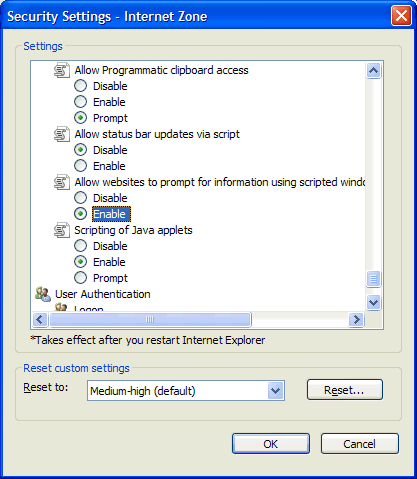
5. Scroll towards the bottom and under "Allow websites to prompt for information using scripted windows" click the Enable radio button.
(see right)

6. Press OK at the bottom of the window.

7. Return to the homepage and try clicking the orders link again. You should now be prompted to enter a password.